My home music server updates itself. Ubuntu installs its security updates and reboots at night, and a weekly job refreshes every container. I was happy with that, and I assumed it meant the server was patched.
Then CVE-2026-98432 landed: a Linux kernel flaw in how IPv4 TCP connections are set up, scored 9.8 out of 10. My Fedora laptop was already on a kernel version with the fix. Debian and others had shipped theirs. Ubuntu’s tracker still said “pending”, and my automation had nothing to install. I had never really considered what my setup does when a fix doesn’t exist yet, or when something I run is no longer maintained. The answer was: nothing, and silently. So I built a way to see it.
The gap in “it updates itself”
Automatic updates answer one question: is there a newer version to install? They say nothing about the questions I now cared about:
| Question | What automatic updates tell me |
|---|---|
| Is this CVE fixed on my server? | Nothing, unless I go and check |
| Is a fix unavailable right now? | Nothing: no update, no message |
| Does an app ship old libraries? | Nothing: pulling latest gets whatever the authors last published |
| What actually changed this week? | Only a log I never read |
The kernel flaw also made it concrete. Containers share the host’s kernel, so a flaw like this sits underneath every app on the server, however well each one is isolated. With a 9.8 and no patch, I wanted to reduce what was exposed until the fix arrived, and that’s a decision I can only make if I know the patch isn’t there.
Options and the decision
n8n had been in my original plan for this server as the glue between services, and this was the first job that actually needed it. I went through several versions:
- A full digest with email and instant alerts. Weekly reports, urgent messages, a mail service. On paper this was the complete answer, but it was too much for a home server.
- Comparing every package against a public CVE database myself, with n8n calling OSV.dev. It’s free and covers Ubuntu, Debian and Alpine. I tested it on my real kernel first, and it did catch this CVE, among 3,486 results. None carried fix information, and that one package took over three minutes.
- A scanner that does the matching, and n8n doing the judging. Grype compares versions and understands distro fix states. n8n adds context from CISA’s list of vulnerabilities known to be exploited, and Ubuntu’s own status for each CVE.
- The same, as a page I bookmark: no email, no alerts.
I chose the fourth. The test in option 2 is the reason I didn’t build the “obvious” version: raw matching gives you a number, not a decision. And giving up alerts is a fair trade here, because the things that fail fast already look after themselves.
How it works
Three parts, each with one job:
A collector on the server. A Python script runs from cron on Sundays at 05:00, an hour after the weekly updates. It records the server’s state (VPN health, pending reboot, disk space), what was updated, and a Grype scan, all in one JSON file.
An n8n workflow. Opening the page runs eight steps: receive the request, read the file, fetch CISA’s list, loop over my CVE watchlist asking Ubuntu’s API for each one’s status, then build the page and return it.
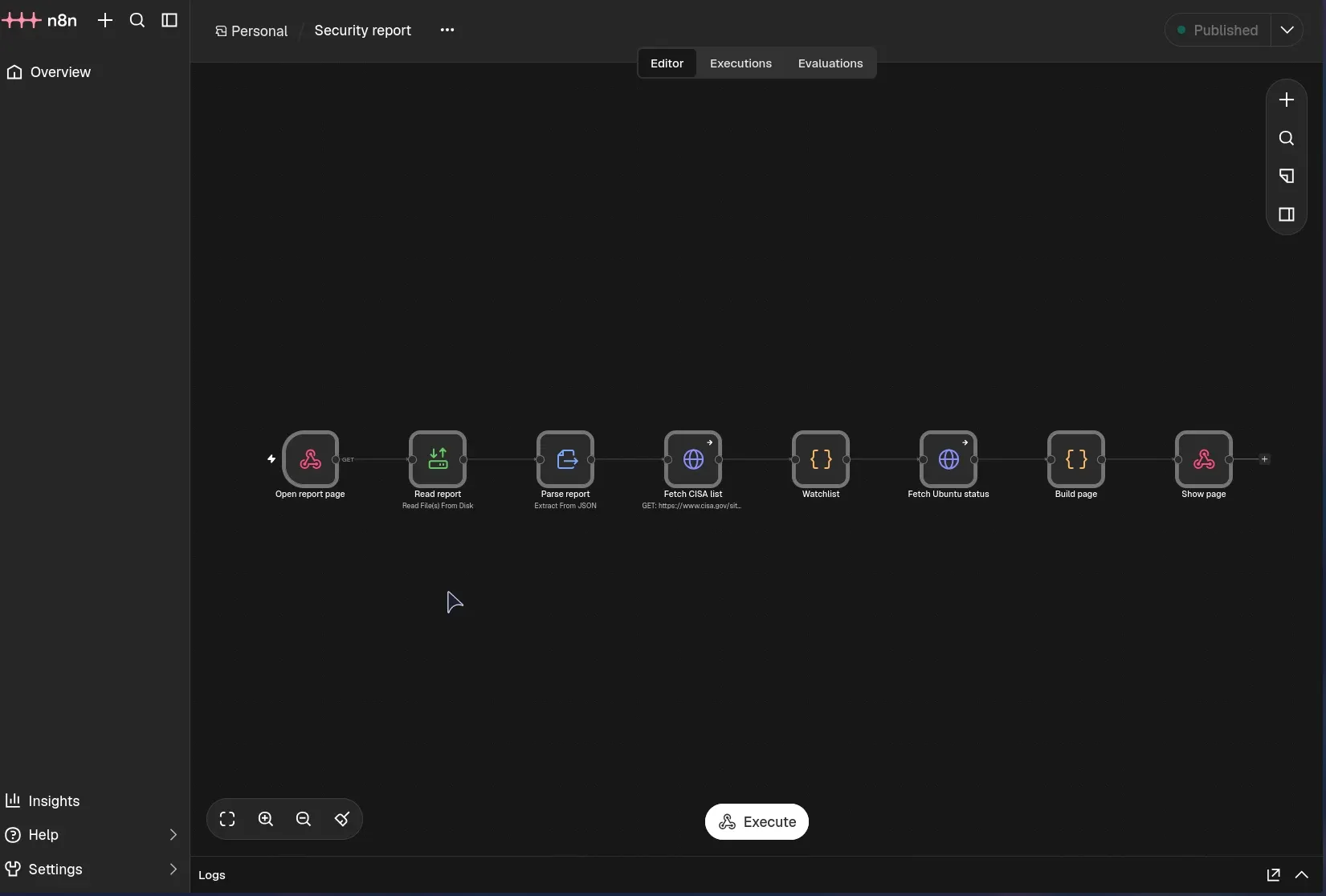
A page, bookmarked next to my other home services. Nothing is sent anywhere.
Keeping the scanner and n8n away from Docker
Access to the Docker socket is close to root on the host, so neither tool gets it. n8n only has a read-only folder containing the report. Grype receives each image as a saved file, and for the host, only the package list:
saved = run("docker", "save", image, "-o", tar)
found, error = scan("docker-archive:/scan/image.tar",
                    "-v", f"{tar}:/scan/image.tar:ro")
I pinned Grype to an exact version rather than latest, and n8n is reachable only on my home network, with no Cloudflare route.
Turning findings into something I can act on
This is the real work, and where n8n earns its place:
- Actively exploited goes first, matched against CISA’s Known Exploited Vulnerabilities list.
- Serious with a fix available comes next, grouped by app, with internet-facing apps at the top. Fixes for apps come with the authors’ next image, so this shows who I’m waiting on.
- Everything else is a single line of counts.
- The kernel has its own line, comparing my running version with Ubuntu’s status for each CVE on my watchlist. As I write this it says “Fix being prepared”. When it changes, I’ll know.
Each scan is also compared with the last: resolved, new, still open. Alongside that is a list of what was updated, so I can finally see the automation working.
What it found on the first run
The first scan paid off straight away:
| Stage | Findings |
|---|---|
| Raw scanner results | 41,283 |
| Without the kernel packages | 8,148 |
| Critical or high, with a fix available | 179 |
| On CISA’s exploited list | 2 |
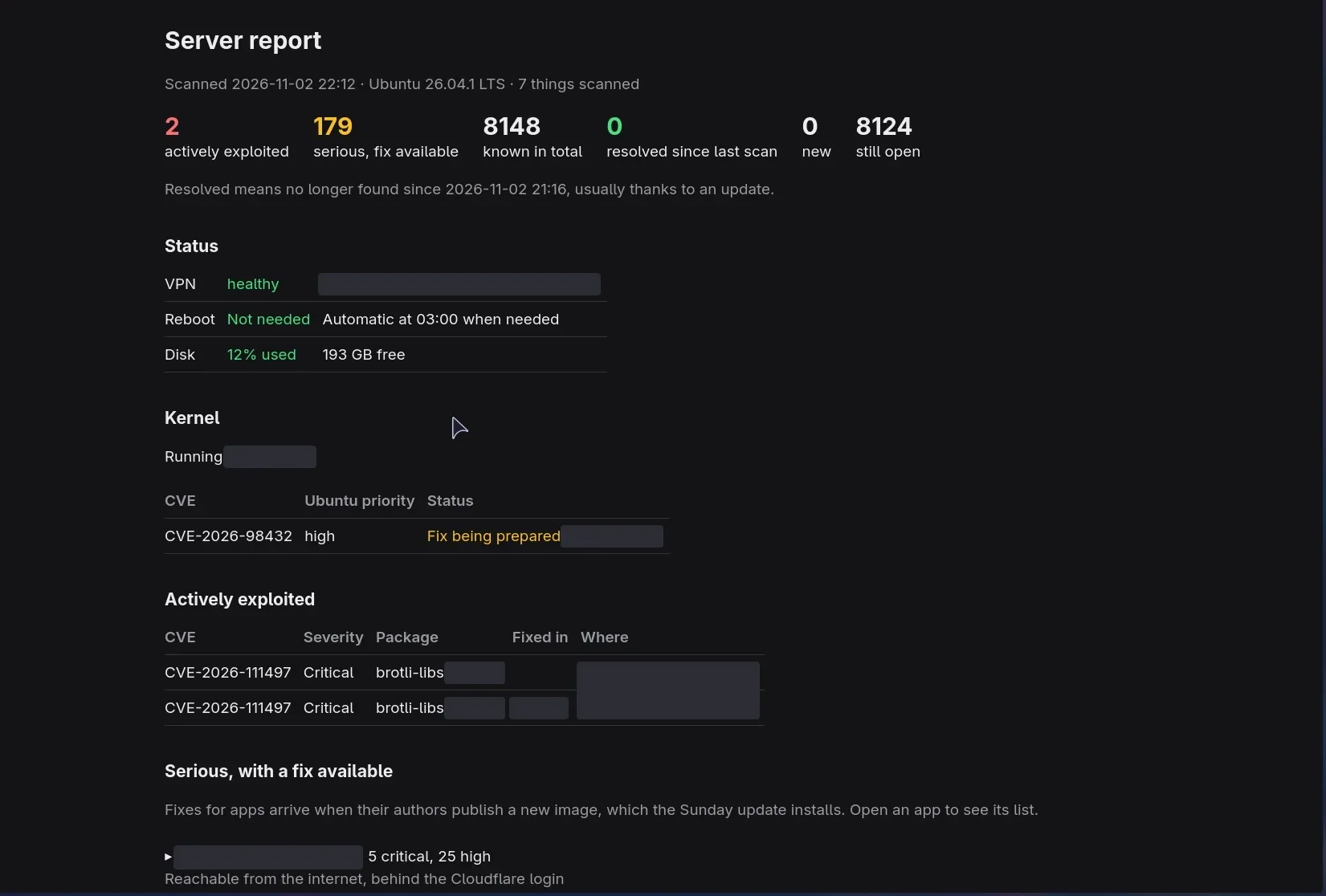
Those two were CVE-2026-111497, a flaw in the Brotli compression library that CISA had added days earlier. It was in two of my app images, and for one of them no fixed image was available yet. I would never have known otherwise.
So I checked by hand, using the page as the starting point. In the first image, the app’s own code doesn’t depend on Brotli; the library appears to be there for other tools in the image. The second was n8n: its request handling only unpacks gzip and deflate, and Node.js, which n8n runs on, carries its own copy of Brotli that my version had already fixed. I rated both low risk, and I’m leaving them to clear with the next images.
Gotchas
- Present is not the same as used. The n8n image holds two copies of Brotli: Node’s patched one and an old system package. Scanners report what is installed, not what runs, which explains most of the scary totals. I looked at adding a “loaded right now” check, but a snapshot that covers only system libraries could make something look safer than it is. I left it out.
- Failed scans looked like good news. My test data showed that if one app’s scan failed, all its old findings counted as “resolved”. The comparison now skips anything that wasn’t scanned successfully.
- A test run caught a counting bug. With nothing changed, the page said 8,148 known but 8,124 still open. Images can hold several copies of one package, and the total counted each copy while the comparison counted them once. Each package now counts once and shows all its versions, so the totals agree.
- A workflow login doesn’t protect a webhook. I assumed my n8n account covered the page. It doesn’t: a published webhook answers anyone who can reach it, so it has its own Basic Auth. A list of my server’s weaknesses shouldn’t be readable by every device on the network.
- Automation can undo a safety measure. When I switched off a VPN feature as a precaution, my VPN watchdog, which restarts stopped containers, would have treated the change as a failure and kept rotating through VPN servers. It now reads the setting from the container and only checks for what is actually switched on.
Results
| Before | After | |
|---|---|---|
| Knowing if a CVE is fixed on my server | Check by hand | One line on a page |
| Knowing a fix doesn’t exist yet | Didn’t know | “Fix being prepared” |
| Knowing what’s under active attack | Didn’t know | Top of the page |
| Knowing what the updates did | Unread logs | Listed per app and package |
When the report was new, I ran the weekly update and the scan early to test it. They found 0 resolved and 0 new, which is right, as nothing had changed in the hour between scans.
One week later
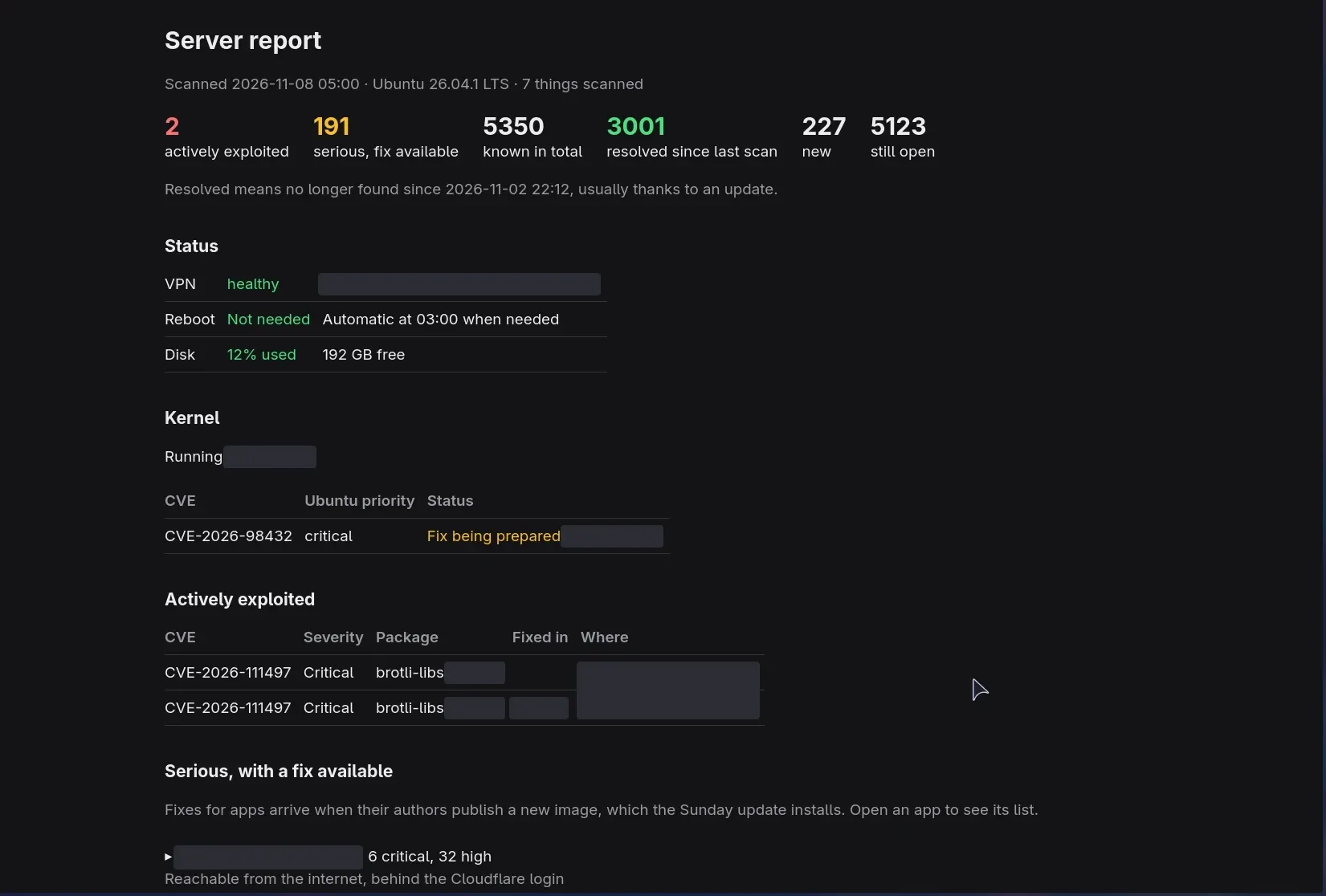
The first real comparison came after the next Sunday’s updates, which brought new images for two of my apps:
| Findings | |
|---|---|
| Previous scan | 8,124 |
| Resolved | 3,001 |
| New | 227 |
| Known now | 5,350 |
That’s about a third fewer known findings in one week, without me touching anything. It’s also the thing I couldn’t see before: the automation doing its job, with numbers. The same week shows its limit. The serious findings with a fix available went up, from 167 to 191, because “new” also includes vulnerabilities published that week in software I already had. And both Brotli findings stayed: one app hadn’t published a new image since before the flaw, and the other’s new image still carried the old library.
What I gave up
- Publishing this is a risk in itself. A list of what’s unpatched on a server is useful to an attacker, so I wouldn’t normally share one. I’m comfortable with this much because the post doesn’t identify the server, the page isn’t reachable from the internet, and I’ve redacted versions and app names in the screenshots. In a professional environment, a report like this would stay internal.
- Nothing comes to me. With no email or alerts, I only see a problem when I open the page. The VPN switches server by itself and updates still run, so I’m fine with that for now.
- It reads, it doesn’t fix. It changes nothing on the server, on purpose.
- Unmaintained software isn’t called out directly. A scanner can’t say “this project is abandoned”. I’d spot it as an app whose findings keep growing while its fix list never clears. The week-to-week comparison makes that visible, but only over time.
- It only knows what’s published. A bug with no CVE yet won’t appear.
The lesson I’m taking from this: automatic updates are worth having, but they are not the same as being patched. They can only install what exists.
Skills used
n8n workflow design (webhooks, HTTP requests, data transformation, custom JavaScript), vulnerability management, Grype, CISA Known Exploited Vulnerabilities, Ubuntu CVE API, OSV.dev, Python scripting, Docker, least-privilege design, Linux server administration, cron automation, risk assessment and triage, testing with sample data, right-sizing a project.