1. Overview & Objective
This proof of concept serves custom content to bots (e.g. Googlebot) and default content to humans, with both versions cached, so performance doesn’t suffer. It suits news sites or sites with paywalled content: crawlers can see the full content for SEO, while the paywall stays in place for logged-out readers.
Goal:
- Bots: Serve a specific “Bot Version” of the page (cached).
- Humans: Serve the standard “Default Version” of the page (cached).
- Performance: Ensure the Cache HIT for both segments.
2. The Challenge: Why PHP Alone Wasn’t Enough
On managed WordPress hosting, the page cache sits in front of the PHP application. On WP Engine, where I built and tested this, that cache is Varnish.
- The “Chicken and Egg” Problem: By the time a request reaches PHP to check
User-Agent, Varnish has already processed the request. - Cache Collision: If PHP detects a bot and serves “Bot Content,” Varnish might unknowingly cache that content under the “Default” bucket. This leads to Cache Poisoning, where human users accidentally see the Bot version.
- No Varnish Access: On managed hosting you can’t modify the Varnish VCL, and changes in Nginx aren’t enough because Varnish sits in front of it.
3. The Solution: Cloudflare “Edge Injection”
I used Cloudflare Workers to intercept the request at the edge, before it reaches the host.
Architecture Flow
- Request: User/Bot visits the site.
- Cloudflare Worker: Checks the
User-Agent.- If Bot: Injects the
wpe-us=botcookie into the request headers transparently. - If Human: Passes the request through untouched.
- If Bot: Injects the
- WP Engine Varnish: Receives the request.
- If Bot: Sees the injected cookie, translates it to
X-WPENGINE-SEGMENT: bot, and serves from the Bot Cache Bucket. - If Human: Sees no cookie, serves from the Default Cache Bucket.
- If Bot: Sees the injected cookie, translates it to
- PHP Application: Receives the request (if uncached) with the correct
X-WPENGINE-SEGMENTheader already set.
Result: Zero PHP overhead for detection, cache compatibility, and zero risk of cache poisoning.
4. Implementation Details
A. Cloudflare Worker Script
Create a new Worker in Cloudflare and map it to example.com/*.
Worker Code:
export default {
  async fetch(request, env, ctx) {
    const ua = request.headers.get('User-Agent') || '';

    // Detect Googlebot or our Custom Test Agent
    // Case-insensitive regex match
    // Edit this list to match the bot User Agents you want to segment
    if (/Googlebot|Caching-Bot/i.test(ua)) {
      // Clone the request to modify headers
      const newRequest = new Request(request);
      const currentCookies = newRequest.headers.get('Cookie') || '';

      // Inject the 'wpe-us=bot' cookie
      // If cookies exist, append it. If not, create it.
      const newCookies = currentCookies ? `${currentCookies}; wpe-us=bot` : 'wpe-us=bot';
      newRequest.headers.set('Cookie', newCookies);

      // Forward modified request to Origin (WP Engine)
      return fetch(newRequest);
    }

    // Pass human traffic through untouched
    return fetch(request);
  }
};
B. WordPress Shortcode (Testing Logic)
Add this to functions.php to create the [segmentation_test] shortcode. This PHP handles the Content Logic (what to show) and ensures the Vary header is set.
PHP Code:
function wpe_segmentation_final_style_shortcode() {
    // 1. CRITICAL: Tell Varnish to separate cache based on the segment header
    header("Vary: X-WPENGINE-SEGMENT");

    // 2. Get Data
    $ua = $_SERVER['HTTP_USER_AGENT'];
    // We rely on the Header because Varnish consumes the Cookie to create it
    $segment_header = isset($_SERVER['HTTP_X_WPENGINE_SEGMENT']) ? $_SERVER['HTTP_X_WPENGINE_SEGMENT'] : '';

    // 3. Display Output
    ob_start();
    ?>
    <div style="border: 2px solid #333; padding: 0; background: #fff; font-family: sans-serif; max-width: 600px; box-shadow: 0 4px 6px rgba(0,0,0,0.1); margin-top: 20px;">
        <div style="background: #333; color: #fff; padding: 20px; border-bottom: 2px solid #000;">
            <h3 style="margin:0 0 10px 0; font-size: 20px; border-bottom: 1px solid #555; padding-bottom: 10px;">Bot vs. Human Check</h3>
            <div style="font-size: 12px; color: #ccc; margin-bottom: 4px; font-weight: bold; text-transform: uppercase;">User Agent Detected:</div>
            <div style="font-family: monospace; font-size: 11px; color: #fff; background: #222; padding: 8px; border-radius: 4px; border: 1px solid #444; word-break: break-all; line-height: 1.4;">
                <?php echo esc_html($ua); ?>
            </div>
        </div>
        <div style="display: grid; grid-template-columns: 1fr 1fr; gap: 10px; padding: 20px; text-align: center; border-bottom: 1px solid #eee;">
            <div>
                <div style="font-size: 11px; text-transform: uppercase; color: #888; font-weight: bold; margin-bottom: 5px;">Server Segment</div>
                <code style="background: #f4f4f4; padding: 6px 4px; border-radius: 4px; font-size: 14px; display: block; font-weight: bold;">
                    <?php echo $segment_header ? esc_html($segment_header) : '<span style="color:#bbb; font-weight:normal;">Default</span>'; ?>
                </code>
            </div>
            <div>
                <div style="font-size: 11px; text-transform: uppercase; color: #888; font-weight: bold; margin-bottom: 5px;">Cache Status</div>
                <div id="x-cache-display" style="font-size: 14px; font-weight: bold; color: gray; padding-top: 3px;">Checking...</div>
            </div>
        </div>
        <div style="padding: 30px; color: white; text-align: center; font-weight: bold; font-size: 24px; <?php echo ($segment_header === 'bot') ? 'background: #d63384;' : 'background: #198754;'; ?>">
            <?php if ($segment_header === 'bot') { echo "🤖 BOT VERSION"; } else { echo "🌍 HUMAN / DEFAULT VERSION"; } ?>
        </div>
    </div>
    <script>
    (function() {
        // Fetch headers to display X-Cache status
        fetch(window.location.href, { method: 'HEAD' })
            .then(response => {
                const cacheStatus = response.headers.get('x-cache');
                const display = document.getElementById('x-cache-display');
                if (cacheStatus) {
                    const color = cacheStatus.includes('HIT') ? 'green' : '#d9534f';
                    display.innerHTML = `<span style="color:${color}">${cacheStatus}</span>`;
                } else {
                    display.innerText = "N/A";
                }
            });
    })();
    </script>
    <?php
    return ob_get_clean();
}
add_shortcode('segmentation_test', 'wpe_segmentation_final_style_shortcode');
5. Verification & Testing
How to Verify (Browser)
- Open Chrome DevTools → cmd+shift+P → Network Conditions.
- Uncheck “Select automatically” next to User agent.
- Test Bot: Select “Custom” and paste
Caching-Bot.- Result: Pink Banner (“BOT VERSION”).
- Cache:
HIT.
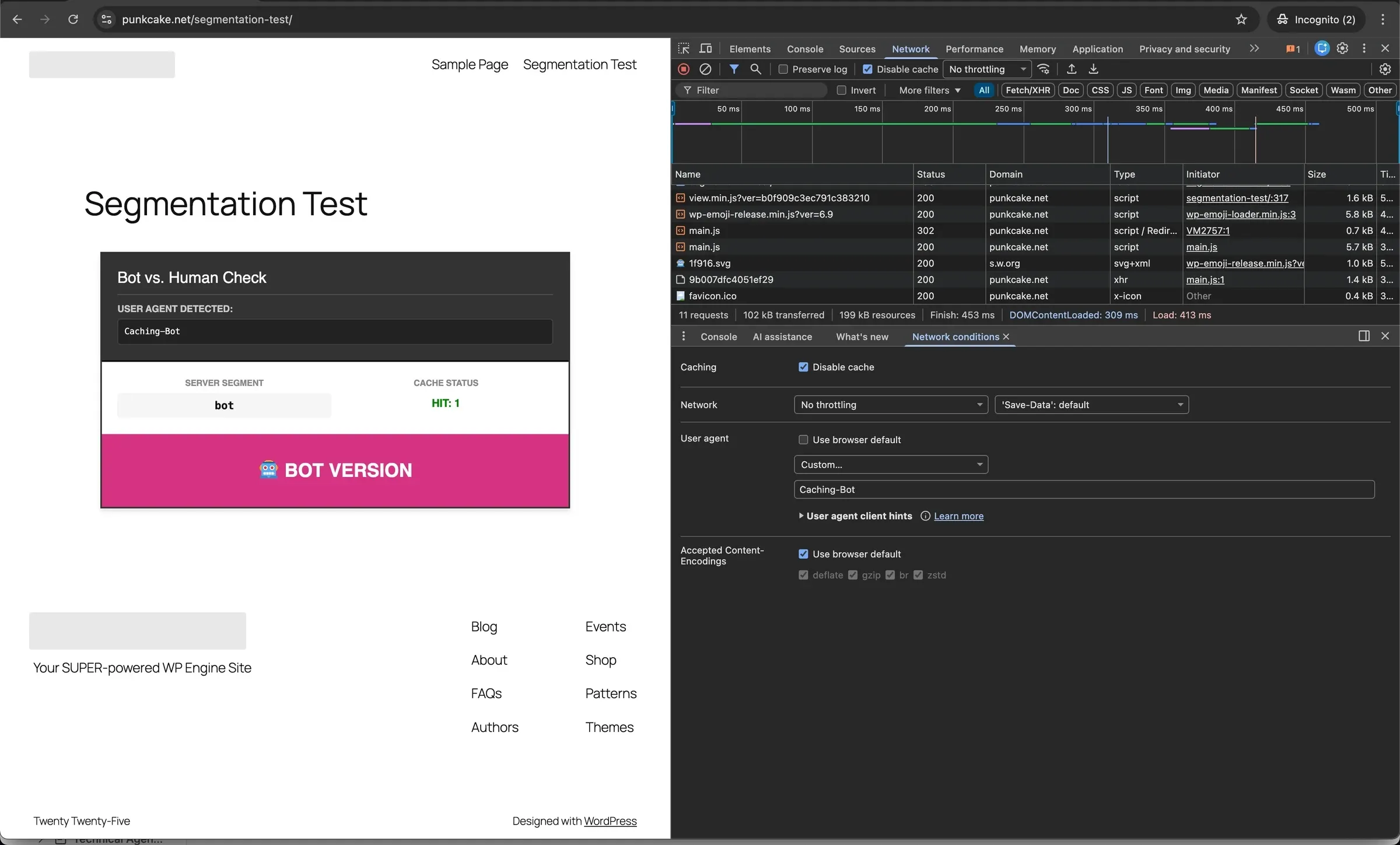
- Test Human: Uncheck “Custom” (Default UA).
- Result: Green Banner (“HUMAN VERSION”).
- Cache:
HIT.
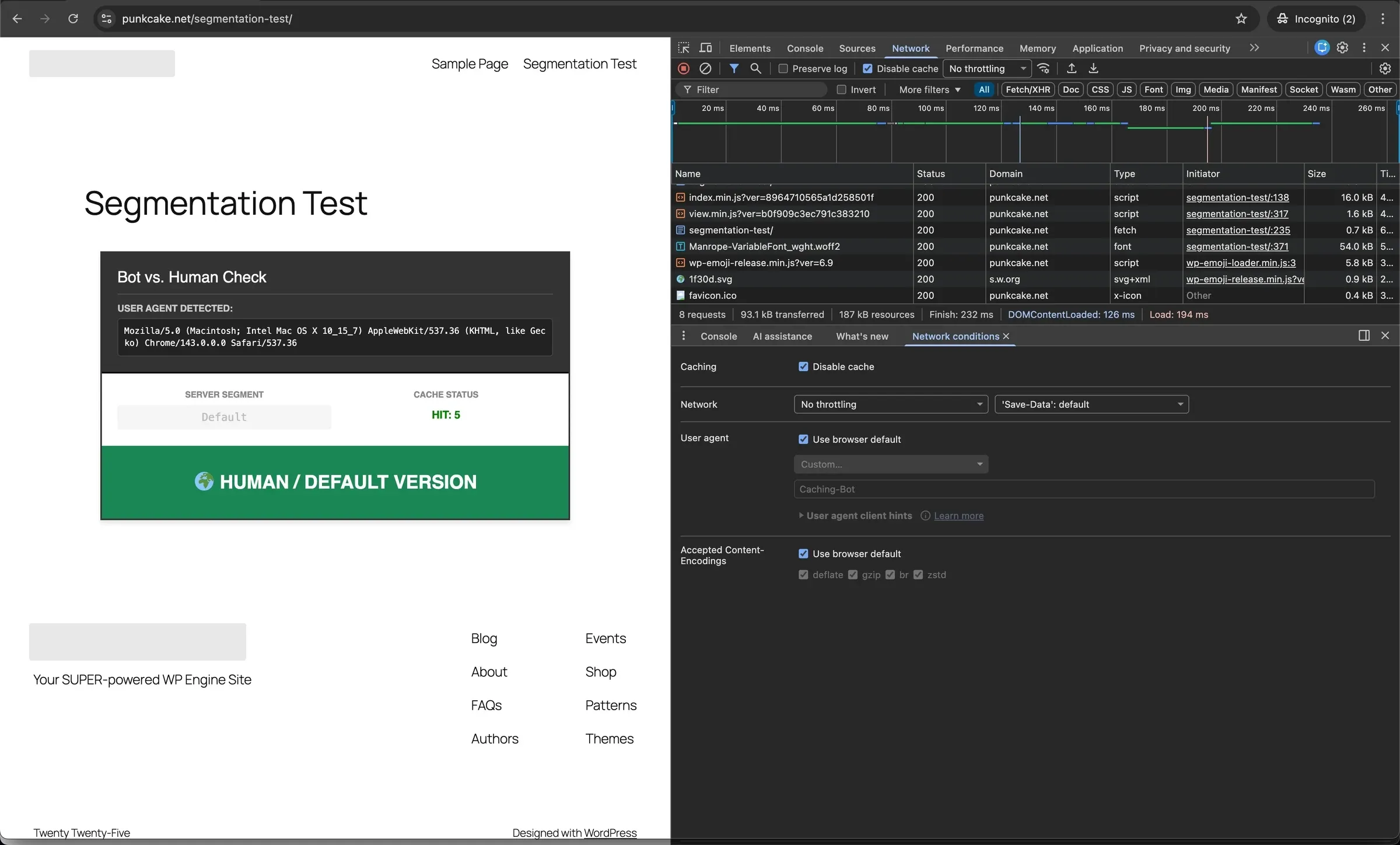
How to Verify (Curl)
Run these commands in a terminal to verify without browser cache interference.
- Bot Test (Expect “BOT VERSION”):
curl -A "Caching-Bot" https://your-site.com/test-page/ | grep "BOT VERSION"
- Human Test (Expect “DEFAULT VERSION”):
curl -A "Mozilla/5.0" https://your-site.com/test-page/ | grep "DEFAULT VERSION"
FAQ: Why is the Cookie “None” in PHP?
You may notice that when testing the Bot, PHP reports the wpe-us cookie as None, even though the Bot logic is working.
- Reason: The cookie is injected by Cloudflare at the edge. When it hits WP Engine, Varnish consumes (removes) the cookie to generate the
X-WPENGINE-SEGMENTheader. - Conclusion: This is expected behaviour. The Header is the source of truth for the application.
Skills used
Cloudflare Workers (JavaScript), edge request manipulation, Varnish cache segmentation, HTTP caching (Vary headers, cookies), WordPress shortcodes in PHP, SEO for paywalled content, testing with Chrome DevTools and curl.