1. Objective
To reduce “alert fatigue” and keep the New Relic APM “Error Rate” metric meaningful.
On managed WordPress hosting you often can’t configure the New Relic agent on the server, so you can’t switch warnings off the usual way. The agent then reports every non-critical PHP warning, notice and deprecation (for example E_WARNING, E_NOTICE), and depending on the site that can be a lot. They inflate the error rate until a noisy log looks no different from a real outage.
The Goal:
- Stop sending PHP Warnings/notices to New Relic (clearing the dashboard).
- Continue writing these errors to the server’s
debug.log(preserving data for debugging). - Ensure valid Transactions are still recorded even if a warning occurs.
2. The Solution
I wrote a small WordPress Must-Use (MU) plugin, nr-warning-suppress.php.
Why an MU-Plugin?
Standard methods (like php.ini or .user.ini) are often locked down on managed hosting, or don’t give the fine-grained control I needed. An MU-plugin loads before standard plugins and themes, so it can register a custom error handler that intercepts errors across the whole application.
How It Works
The script uses a “catch and release” logic:
- Intercept: It listens for specific PHP error types (
E_WARNING,E_NOTICE, etc.). - Log: It manually writes the error details to the local
debug.logfile, prefixed with[NR-SUPPRESSED]. - Suppress: It returns
trueto PHP. This tells the PHP engine “I have handled this error, do not pass it to the default reporter.” Consequently, New Relic never sees the error. - Passthrough: For critical errors (like
E_ERRORcrashes), it returnsfalse, allowing them to bubble up to New Relic as normal.
3. Implementation Guide
Prerequisites
- SSH to the environment.
- Go to the
wp-content/mu-plugins/directory.
Step-by-Step
- Create a file named
nr-warning-suppress.php. - Paste the code below into the file.
- Upload the file to the
/wp-content/mu-plugins/directory on the server. - No activation is required; MU-plugins run automatically.
The Code
<?php
/*
Plugin Name: New Relic Warning Suppressor
Description: Captures Warnings, Notices, and Deprecated errors to keep New Relic APM clean, while preserving them in debug.log.
Version: 1.0
*/

set_error_handler('nr_suppress_warnings_handler');

function nr_suppress_warnings_handler($errno, $errstr, $errfile, $errline) {
    static $is_handling = false;
    if ($is_handling) {
        return false;
    }

    // DEFINE TYPES TO HIDE FROM NEW RELIC
    $ignored_types = [
        E_WARNING,
        E_NOTICE,
        E_USER_WARNING,
        E_USER_NOTICE,
        E_DEPRECATED,
        E_USER_DEPRECATED
    ];

    // CHECK IF CURRENT ERROR IS IN OUR LIST
    if (in_array($errno, $ignored_types, true)) {
        $is_handling = true; // Lock to prevent loops

        // Get a readable name for the log file
        $type_str = 'Error';
        switch ($errno) {
            case E_WARNING: $type_str = 'Warning'; break;
            case E_NOTICE: $type_str = 'Notice'; break;
            case E_DEPRECATED: $type_str = 'Deprecated'; break;
            case E_USER_WARNING: $type_str = 'User Warning'; break;
            case E_USER_NOTICE: $type_str = 'User Notice'; break;
            case E_USER_DEPRECATED: $type_str = 'User Deprecated'; break;
        }

        // Create the log message
        // [NR-SUPPRESSED] tag helps us grep/filter these lines later
        $log_message = "[NR-SUPPRESSED] PHP $type_str: $errstr in $errfile on line $errline";

        // Write to debug.log (using @ to silence legitimate logging errors)
        @error_log($log_message);

        $is_handling = false; // Unlock

        // Return TRUE: Tells PHP "I handled it, do not send to New Relic"
        return true;
    }

    // Return FALSE: Let legitimate crashes (E_ERROR, etc.) bubble up to New Relic
    return false;
}
4. Verification & Testing
To confirm the solution is working:
- Generate a Warning: (Temporarily) add a line of code that triggers a warning, or visit a page known to generate one.
- Example Trigger:
fopen("non_existent_file.txt", "r"); - Example of a file you can add to the root of the environment to generate warnings:
- Example Trigger:
<?php
require( './wp-load.php' ); // Loads WordPress environment

// Trigger Warning
echo "Triggering Warning...";
$file = fopen("non_existent_file_123.txt", "r");
echo "Done.";
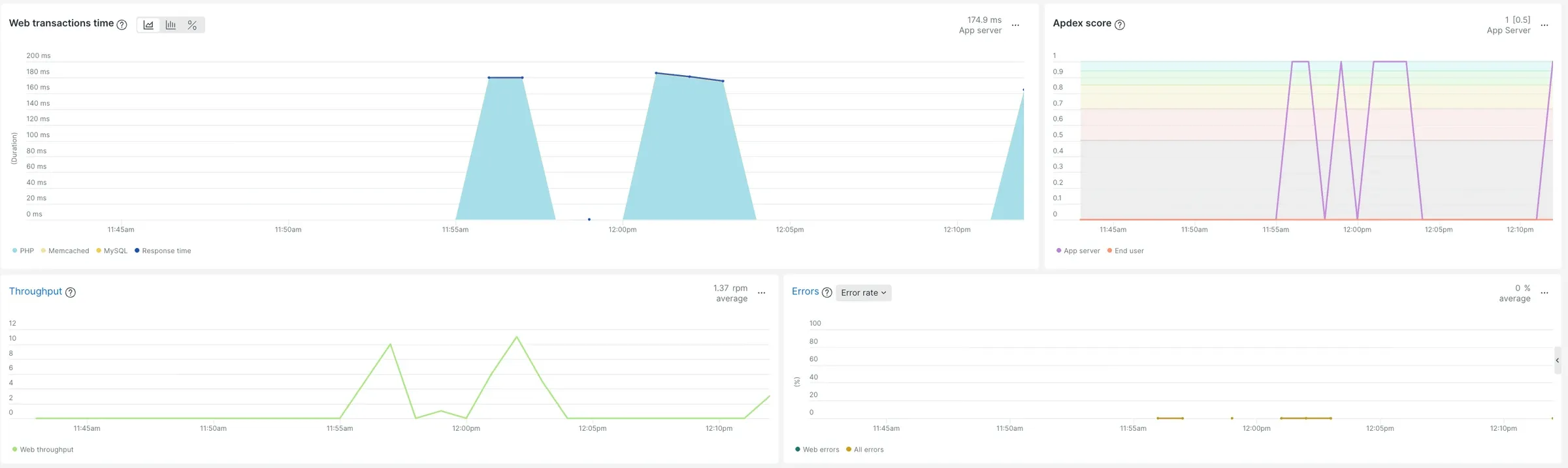
?>- Check New Relic:
- Go to APM > Events > Errors.
- Ensure the specific warning is NOT listed.
- Ensure the Transaction for that page load IS recorded.
- Check Server Logs:
- On WP Engine, where I tested this, connect via SSH and run
phpfatal -vto view the warnings being generated.
- On WP Engine, where I tested this, connect via SSH and run

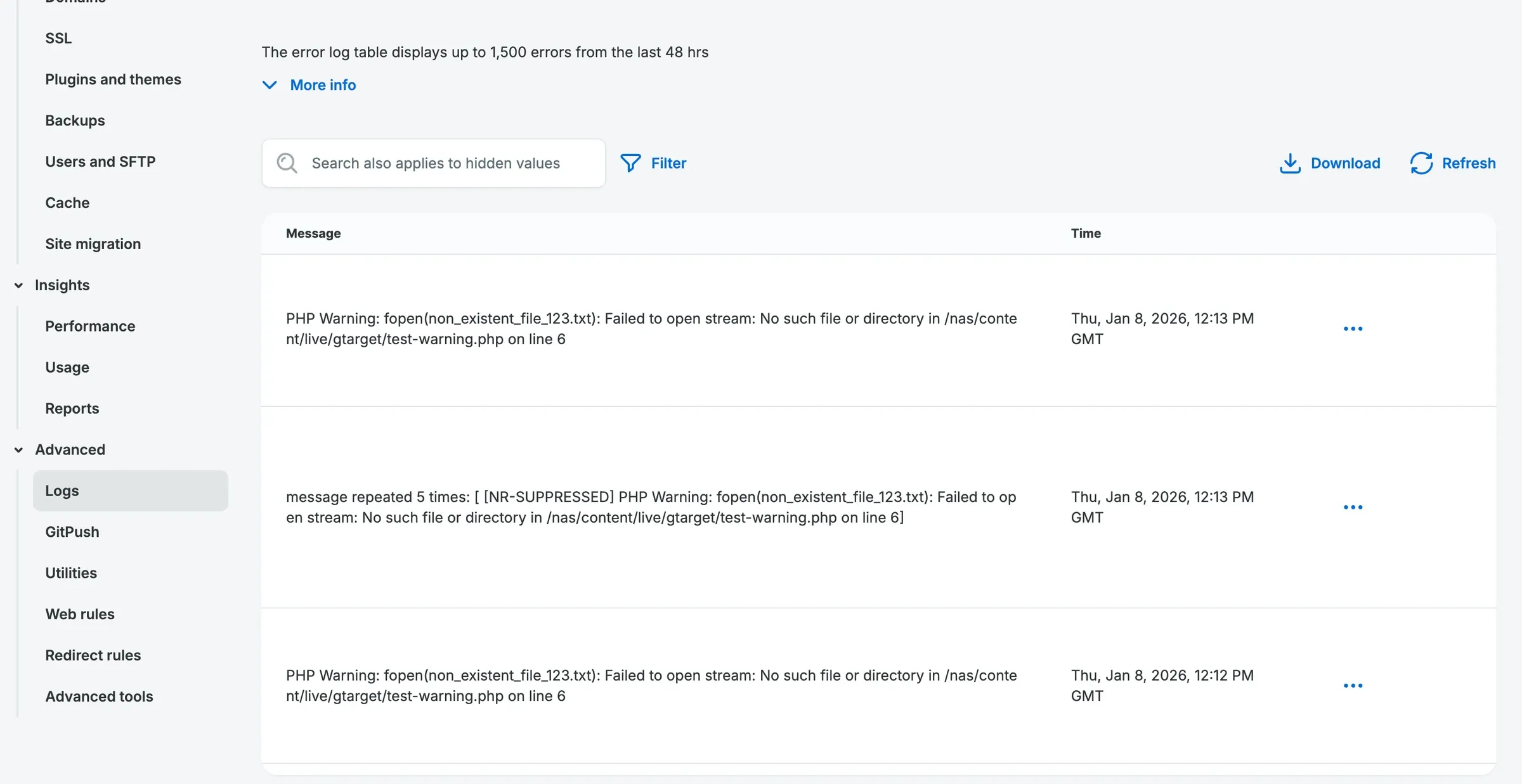
- Check the Host’s Logs:
- In WP Engine’s User Portal, open the environment, then its logs, to see the warnings, now tagged
[NR-SUPPRESSED].
- In WP Engine’s User Portal, open the environment, then its logs, to see the warnings, now tagged
Skills used
PHP (custom error handlers), WordPress must-use plugins, New Relic APM, observability and alert tuning, working within managed WordPress hosting limits, log analysis over SSH.